Out-of-scope change events
This Company level Insights tool is available in the Insights side panel. This Insights tool shows how much open and pending change event value sits outside the current contract scope across projects. It summarises total out-of-scope value, breaks it out against pending scope and in scope value and calls out the percentage and pound value that is still missing a potential variation or main contract variation (MCV). It surfaces unbilled out-of-scope exposure and its age directly. Project and finance teams can find unbilled scope earlier, prioritise which change events need a variation first and reduce the aged exposure that is hardest to recover.
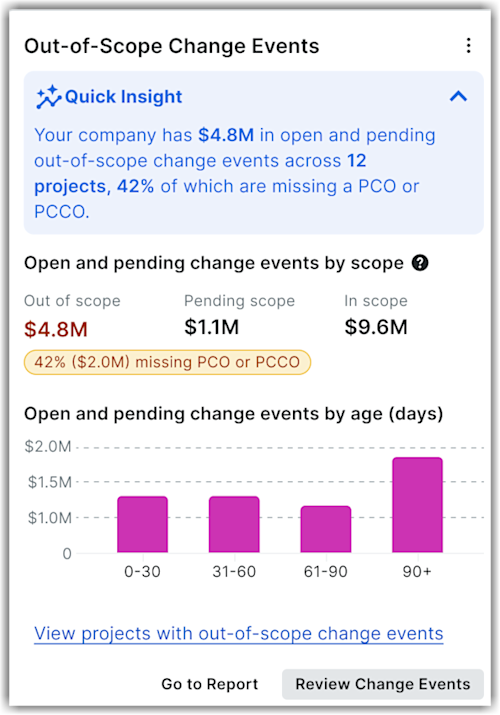
The Company level Out-of-scope change events Insights tool shows the following:
-
Quick insight: This section summarises the total open and pending out-of-scope change event value and the percentage of it missing a PV or MCV. It also shows how many projects contribute to that value.
-
Open and pending change events by scope: This section displays a three-metric row showing Out of scope (emphasised), Pending scope and In scope values across projects. It also highlights the percentage and pound value that is still missing a PV or MCV. This helps teams to track the out-of-scope exposure without manually auditing the change events log.
-
Open and pending change events by age (days): This section displays a bar chart grouping open and pending change event values by age in 0-30, 31-60, 61-90 and 90+ day ranges. This helps you see how long exposure has been outstanding. The age breakdown indicates teams which exposure to prioritise first.
-
Drill-down option: Click View projects with out-of-scope change events to view the Projects driving exposure table. This table lists top projects with Project name, Contract value, Out of scope change events and % missing PV/MCV columns. Click a project name to view details.
Click Review change events to navigate to the change events tool directly. Similarly, click Got to reports to go to the reports page.